Important safety tip. If a method or constructor requires a Context, don't pass it an Activity. It works, but it's too dangerous. It's just too easy to leak the activity. Better to do activity.getApplicationContext().
Corollary: Follow this rule except when you can't. :-) It turns out that if the code that requires the Context reference needs to start an activity, you'll get an exception if it doesn't set the FLAG_ACTIVITY_NEW_TASK flag in the Intent:
java.lang.RuntimeException: Unable to start activity ... Calling startActivity() from outside of an Activity context requires the FLAG_ACTIVITY_NEW_TASK flag. Is this really what you want?

Showing posts with label Android. Show all posts
Showing posts with label Android. Show all posts
Wednesday, January 23, 2013


Wednesday, December 7, 2011
Custom View Drawing in Android with Infinite Recursion
Nice title, eh? No, it's not something you want to do, but it's something easy to do if you take a shortcut.
In View.onDraw, you might be tempted to call this.setBackgroundDrawable, or this.setBackgroundColor like this:
That's a bad idea. These calls result in a recursive call to your onDraw method (although the Android javadocs don't seem to say so). You might not notice at first, or at all, until one day something draws attention to the fact that your view is furiously drawing itself repeatedly forever.
The solution is to use the Canvas and Drawable methods that do the same things. It's just as easy, and you'll avoid the unwanted recursion.
In View.onDraw, you might be tempted to call this.setBackgroundDrawable, or this.setBackgroundColor like this:
 @Override
 protected void onDraw(Canvas canvas) {
          if (image) {
            setBackgroundDrawable(d);
          } else {
            setBackgroundColor(0xffffffff);
          }
 }
That's a bad idea. These calls result in a recursive call to your onDraw method (although the Android javadocs don't seem to say so). You might not notice at first, or at all, until one day something draws attention to the fact that your view is furiously drawing itself repeatedly forever.
The solution is to use the Canvas and Drawable methods that do the same things. It's just as easy, and you'll avoid the unwanted recursion.
 @Override
 protected void onDraw(Canvas canvas) {
          if (image) {
            d.draw(canvas)
          } else {
            canvas.drawColor(0xffffffff);
          }
 }
Thursday, November 3, 2011
NullPointerException in IntentService
0x000000
NullPointerException. My all time favorite Java exception. Probably the single most common exception in Java. Richly ironic, isn't it? For a language that doesn't have "pointers?"
Anyway, my latest encounter with NPE was one thrown from the Android framework in the constructor of my IntentService-derived class.
Try it:
Here's the inheritance hierarchy:

The no-args constructor of Service, which extends ContextWrapper, calls super(null). So wrapper is wrapping null.
ContextWrapper doesn't do much of anything but delegate calls to the real context that it's given. So if you try to make any calls on the Context during construction, you will get an NPE.
Your IntentService derived class, although it gets instantiated when the app starts, will not get a Context until it gets "attached."
That happens before your onHandleIntent method gets invoked. So anything that needs a Context will have to wait until onHandleIntent gets called.
NullPointerException. My all time favorite Java exception. Probably the single most common exception in Java. Richly ironic, isn't it? For a language that doesn't have "pointers?"
Anyway, my latest encounter with NPE was one thrown from the Android framework in the constructor of my IntentService-derived class.
Try it:
public class MyService extends IntentService {


    public MyService() {

        super("MySericeName");

        String s = this.getPackageName();
NullPointerException at
android.content.ContextWrapper.getPackageName(ContextWrapper.java:120)
Here's the inheritance hierarchy:
The no-args constructor of Service, which extends ContextWrapper, calls super(null). So wrapper is wrapping null.
ContextWrapper doesn't do much of anything but delegate calls to the real context that it's given. So if you try to make any calls on the Context during construction, you will get an NPE.
Your IntentService derived class, although it gets instantiated when the app starts, will not get a Context until it gets "attached."
That happens before your onHandleIntent method gets invoked. So anything that needs a Context will have to wait until onHandleIntent gets called.
Launching an Intent by Action
I had some trouble getting my implicit intent to launch. An implicit intent is one that uses just the action name string, without specifying the actual class of the action to launch.
This is an explicit Inent:
My app has two different flavors (see earlier post on supporting this), and each one needs to handle a pending intent (in a user Notification) with different Activity classes. So, the common code, rather than trying to figure out what Activity class to start -- that would be evil indeed, a library having a dependency on its clients -- it specifies an Action in the pending intent, like this:
Here is the snippet from the manifest:
Two things I did wrong. Both were clearly stated in the documentation, but I missed it.
First, the action name MUST be prefixed with the application package, as declared in the manifest.
Second, the intent-filter element must contain the android.intent.category.DEFAULT category, or else Android will not find your activity to launch.
So the proper intent filter in the manifest should look like this:
And, of course, the action specified in the Intent constructor should be "com.example.MY_ACTION".
Works great after doing this.
This is an explicit Inent:
new Intent(context, com.example.MyActivity.class);This is an implicit Intent:
new Intent("com.example.my_action");
My app has two different flavors (see earlier post on supporting this), and each one needs to handle a pending intent (in a user Notification) with different Activity classes. So, the common code, rather than trying to figure out what Activity class to start -- that would be evil indeed, a library having a dependency on its clients -- it specifies an Action in the pending intent, like this:
PendingIntent.getActivity(
    this, -1, new Intent("MY_ACTION")...
Here is the snippet from the manifest:
<activity android:name="com.example.MyActivity" >
  <intent-filter>
        <action android:name="MY_ACTION" />
 </intent-filter>

</activity>
Problem was that I would tap on the notification, but nothing would happen. I finally noticed the following line in LogCat:
WARN/IntentResolver(61): resolveIntent failed: found match, but none with Intent.CATEGORY_DEFAULT
Two things I did wrong. Both were clearly stated in the documentation, but I missed it.
First, the action name MUST be prefixed with the application package, as declared in the manifest.
Second, the intent-filter element must contain the android.intent.category.DEFAULT category, or else Android will not find your activity to launch.
So the proper intent filter in the manifest should look like this:
<intent-filter>
  <action android:name="com.example.MY_ACTION" />
  <category android:name="android.intent.category.DEFAULT" />

</intent-filter>
And, of course, the action specified in the Intent constructor should be "com.example.MY_ACTION".
Works great after doing this.
Tuesday, October 25, 2011
Are Anonymous Inner Classes Evil in Android Apps?
Not intrinsically evil, but potentially problematic enough that they ought to be avoided (just in Android apps)?

 I have now encountered two problems -- one handling dialogs, the other a leaked Intent Receiver -- that were both the result of not carefully using anonymous inner classes in an Android app.
Part of the reason it is tricky is that you don't have total control over the life cycle of your application's classes in Android.
In the dismissDialog defect, which is described here, if the Thread were a separate class that did not have access to my activity's privates, then I would be forced to deal with the dependency in a more explicit way. The problem would have been more immediately obvious.
I love anonymous inner classes. They're the closest thing we've got to closures in Java. But in an Android app, it seems wise to either avoid them altogether, or think very carefully about what you're doing when you use one.

Part of the reason it is tricky is that you don't have total control over the life cycle of your application's classes in Android.
In the dismissDialog defect, which is described here, if the Thread were a separate class that did not have access to my activity's privates, then I would be forced to deal with the dependency in a more explicit way. The problem would have been more immediately obvious.
I love anonymous inner classes. They're the closest thing we've got to closures in Java. But in an Android app, it seems wise to either avoid them altogether, or think very carefully about what you're doing when you use one.
An Android Worker Thread: Neat, Plausible and Wrong

So you're smart. You know not to block the main (aka UI) thread in your Android app. So you put your heavy work in a background thread. Excellent.
You're also kind enough to display a progress dialog, since the user can't do much in your app until your work is done.
And you're even educated enough to know that you really should call dismissDialog on the UI thread.
But then you do something dumb, like I did. Your solution looks like mine (below).
It works great at first. The dialog pops up, the thread does its work, and 5 seconds later, the dialog goes away.
public class ScratchActivity extends Activity {

    private static final String TAG = "ScratchActivity";

    private ProgressDialog dialog = null;

    @Override
    public void onCreate(Bundle savedInstanceState) {
        super.onCreate(savedInstanceState);
        setContentView(R.layout.main);

        Button button = (Button) findViewById(R.id.button);
        button.setOnClickListener(new View.OnClickListener() {

            @Override
            public void onClick(View view) {
                doSomethingInBackground();
            }

        });
    }

    protected void doSomethingInBackground() {
        showDialog(1);

        Thread someBackgroundProcess = new Thread() {

            @Override
            public void run() {
                try {
                    Thread.sleep(5000);
                    allDoneNow();

                } catch (Exception ex) {
                    Log.d(TAG, "ahhhh", ex);
                }
            }
        };
        someBackgroundProcess.start();
    }

    private void allDoneNow() {

        runOnUiThread(new Runnable() {

            @Override
            public void run() {

                try {
                 dismissDialog(1);

                }catch(Exception ex) {
                    Log.d(TAG, "ahhhh", ex);
                }
            }
        });
    }

     @Override
    protected Dialog onCreateDialog(int id) {
         Log.d(TAG, "onCreateDialog " + id);

        if (dialog == null) {
            dialog = new ProgressDialog(this);
        }
        return dialog;
    }
Trouble Strikes
 Then you do the unthinkable. You press the button to show the dialog, and before the dialog gets dismissed, you rotate your device into landscape mode.
You wait. And wait. And wait...
The stupid black dialog never goes away. So you smartly check LogCat and discover:
no dialog with id 1 was ever shown !!
10-25 11:26:41.738: DEBUG/ScratchActivity(2279): ahhhh
10-25 11:26:41.738: DEBUG/ScratchActivity(2279): java.lang.IllegalArgumentException: no dialog with id 1 was ever shown via Activity#showDialog
10-25 11:26:41.738: DEBUG/ScratchActivity(2279): at android.app.Activity.missingDialog(Activity.java:2600)
10-25 11:26:41.738: DEBUG/ScratchActivity(2279): at android.app.Activity.dismissDialog(Activity.java:2585)
10-25 11:26:41.738: DEBUG/ScratchActivity(2279): at com.scratch.ScratchActivity$3.run(ScratchActivity.java:68)
"It sure the heck was shown!" You scream at the stupid framework. "If it wasn't shown, how is it on my screen?"
Idiotic voodoo framework.
Oh, oops
After a little noodling on the problem for a while -- even wondering whether there is a bug in the framework -- you (by which I mean me) realize the problem is indeed your own stupid code, by which I mean yours, not mine ;-)
The problem is subtle, insofar as it involves not what is explicit in the code, but what is implicit in the code. When you create your anonymous inner class on line 26 above --
        ...  new Thread() {
        ...
                allDoneNow();
...
What ScratchActivity instance is allDoneNow going to execute with? The anonymous class gets an implicit reference to the current ScratchActivity instance. Ok, fine.
Problem is, when you change orientation, Android -- by default -- destroys your activity and creates a new one. That means the anonymous inner class is now referring to the old ScratchActivity instance (which is now torn-down). The activity on screen is a new instance.
Now, if you use showDialog to create a dialog, the Activity class adds the dialog to a list of dialogs that it is managing (so that it can dismiss it, restore it, etc. during the activity life cycle).
Later, in Activity.onDestroy, the list of so-called "managed dialogs" gets set to null. So it makes sense, then, that calling dismissDialog on a destroyed activity must fail.
Fabulous! So, let's change our code to ensure that the background thread will call the right ScratchActivity instance.
One thing we have to consider, though, is a kind of race condition. We have to ensure that we do not try to fetch a reference to the activity while a configuration change is impending. [Orientation changes are considered configuration changes.]
The simplest way to do that is by having the code execute on the UI thread. Fortunately, we've already done that by using Activity.runOnUiThread.
Once on the UI thread, it is guaranteed that the call to dismissDialog will occur entirely before or entirely after the orientation change.
Now that we've got that covered, the most straightforward thing to do is add a static field to hold the currently active Activity. Then we set that field in onCreate.
private static Activity currentActivity = null;
    public static synchronized Activity getCurrentActivity() {
        return currentActivity;
    }

    public static synchronized void setCurrentActivity(Activity activity) {
        currentActivity = activity;
    }

    @Override
    public void onCreate(Bundle savedInstanceState) {
        setCurrentActivity(this);
        super.onCreate(savedInstanceState);
Then, allDoneNow, instead of calling just dismissDialog(1); calls getCurrentActivity().dismissDialog(1);
Problem solved, right?
Ugh, Not Yet
This code is bad too! We just caused a memory leak. When the activity is all done -- for real, not because of an orientation change -- currentActivity (a static field) continues to hold a reference to the activity, which keeps it, and the entire object graph that it references, in memory.
Simple, fix, though. Just be sure to call setCurrentActivity(null) in onDestroy.
So an acceptable solution might look like this. Although, there are other ways to do this, and it sure would be nice if the framework helped a little more. Maybe Activity itself could provide this capability.
public class ScratchActivity extends Activity {

    private static final String TAG = "ScratchActivity";

    private ProgressDialog dialog = null;

    private static Activity currentActivity = null;

    public static synchronized Activity getCurrentActivity() {
        return currentActivity;
    }

    public static synchronized void setCurrentActivity(Activity activity) {
        currentActivity = activity;
    }

    @Override
 protected void onDestroy() {
  super.onDestroy();
  setCurrentActivity(null);
 }

    @Override
    public void onCreate(Bundle savedInstanceState) {
        super.onCreate(savedInstanceState);
        setContentView(R.layout.main);

        Button button = (Button) findViewById(R.id.button);
        button.setOnClickListener(new View.OnClickListener() {

            @Override
            public void onClick(View view) {
                doSomethingInBackground();
            }

        });
    }

    protected void doSomethingInBackground() {
        showDialog(1);

        Thread someBackgroundProcess = new Thread() {

            @Override
            public void run() {
                try {
                    Thread.sleep(5000);
                    allDoneNow();

                } catch (Exception ex) {
                    Log.d(TAG, "ahhhh", ex);
                }
            }
        };
        someBackgroundProcess.start();
    }

    private void allDoneNow() {

        runOnUiThread(new Runnable() {

            @Override
            public void run() {

                try {
                 dismissDialog(1);

                }catch(Exception ex) {
                    Log.d(TAG, "ahhhh", ex);
                }
            }
        });
    }

     @Override
    protected Dialog onCreateDialog(int id) {
         Log.d(TAG, "onCreateDialog " + id);

        if (dialog == null) {
            dialog = new ProgressDialog(this);
        }
        return dialog;
    }
There are other solutions to this problem of course, but this one is simple enough for now.All of this brings me to the topic of my next post:
Are Anonymous Inner Classes Evil for Android Apps?
Thursday, October 20, 2011
Android ScrollView and Horizontal Scrolling
Don't waste your time trying to make ScrollView scroll horizontally. It doesn't. And the API docs clearly say so.
For horizontal scrolling, use HorizontalScrollView.
If you need both horizontal and vertical scrolling, like I did, it works to embed the two. Looks like this:
For horizontal scrolling, use HorizontalScrollView.
If you need both horizontal and vertical scrolling, like I did, it works to embed the two. Looks like this:
<?xml version="1.0" encoding="utf-8"?>
<ScrollView
    xmlns:android="http://schemas.android.com/apk/res/android"
    android:fillViewport="false"
    android:fadeScrollbars="true"
    android:layout_width="fill_parent"
    android:layout_height="fill_parent">

<HorizontalScrollView
    android:layout_width="fill_parent"
    android:layout_height="fill_parent"

>
    <RelativeLayout
        android:layout_width="wrap_content"
        android:layout_height="wrap_content">
Friday, October 14, 2011
aRRRR!! Getting R Into a Different Package
R
In the post on creating an Android library to support multiple application files, I ran into the problem of what the Android SDK considers -- at least internally -- the "manifest package."
 That package gets used for too many things, I think. I believe that the application ID, the application's user ID and the
resource package should all be independently determinable. Alas they
are not. At least not yet.
That package gets used for too many things, I think. I believe that the application ID, the application's user ID and the
resource package should all be independently determinable. Alas they
are not. At least not yet.
Some day you might need to control the specific package that R gets generated in. I'm not sayin it's a good idea. But somebody will want to do it. Just sayin...
So here is a hack of a whorkaround [sic] to get R into the fixed package of your nightmarish fancy...
If you're using ANT to build your app, then things are a little easier. If you're using only ADT, there are a couple of extra steps.
First thing to do, if you're using ADT only, is to create ant build files: build.properties and build.xml. Simplest way to do this is to create a dummy Android Ant project and copy those files:
android create project -n duh -p duh -k org.duh -t 2 -a duh
Once you have your and build files, open build.xml. Scroll down. Close to the bottom, you should see a line like this:
Just above that line, copy and paste the following xml:
Now, open build.properties and enter this line:
If you are building with ANT, then that's all you have to do. You can now change your package in your manifest without it moving your R.java file.
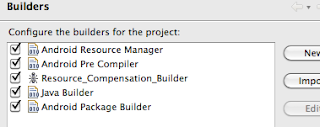
If you are using ADT, there will be one more hack you'll want to do. Every time the Android Pre Compiler builder runs (which will be frequently if you have automatic builds turned on), it will clobber your beloved R.java.
Here's what you can do about that.

Go to Project... Properties...
In the post on creating an Android library to support multiple application files, I ran into the problem of what the Android SDK considers -- at least internally -- the "manifest package."

Some day you might need to control the specific package that R gets generated in. I'm not sayin it's a good idea. But somebody will want to do it. Just sayin...
So here is a hack of a whorkaround [sic] to get R into the fixed package of your nightmarish fancy...
If you're using ANT to build your app, then things are a little easier. If you're using only ADT, there are a couple of extra steps.
First thing to do, if you're using ADT only, is to create ant build files: build.properties and build.xml. Simplest way to do this is to create a dummy Android Ant project and copy those files:
android create project -n duh -p duh -k org.duh -t 2 -a duh
Once you have your and build files, open build.xml. Scroll down. Close to the bottom, you should see a line like this:
<setup />
Just above that line, copy and paste the following xml:
    <target name="-dirs">
            <echo>Creating output directories if needed...</echo>
            <mkdir dir="${resource.absolute.dir}" />
            <mkdir dir="${jar.libs.absolute.dir}" />
            <mkdir dir="${out.absolute.dir}" />
            <if condition="${manifest.hasCode}">
                <then>
                    <mkdir dir="${gen.absolute.dir}" />
                    <mkdir dir="${out.classes.absolute.dir}" />
                </then>
            </if>
    </target>

    <target name="-resource-src" depends="-dirs">
        <if condition="${manifest.hasCode}">
            <then>

                <echo>Generating R.java / Manifest.java from the resources using custom aapt execution...</echo>
                <exec executable="${aapt}" failonerror="true">
                            <arg line="package -v --custom-package ${resource.custom.package} -M AndroidManifest.xml -I ${android.jar} -J ${gen.absolute.dir} -S ${resource.absolute.dir}" />
                            <arg value="-m"/>
                        </exec>
            </then>
            <else>
                <echo>hasCode = false. Skipping...</echo>
            </else>
        </if>
    </target>
    <target name="resource-src-fix" depends="-resource-src" />
Now, open build.properties and enter this line:
resource.custom.package=org.inanity.domestic
If you are building with ANT, then that's all you have to do. You can now change your package in your manifest without it moving your R.java file.
If you are using ADT, there will be one more hack you'll want to do. Every time the Android Pre Compiler builder runs (which will be frequently if you have automatic builds turned on), it will clobber your beloved R.java.
Here's what you can do about that.

Go to Project... Properties...
- Select Builders and click on the New... button.
- Select "Ant Builder" from the list and click Ok.
- In the Main tab, click the Browse Workspace... button to find your modified build.xml file.
- Switch to the Targets tab and select the "resource-src-fix" target wherever you want it.
- Name your builder something sensible -- like Resource_compensation_builder -- and click Ok.

Disclaimer: I never said that any of this this was a good idea. Just that it can be done. :-)
Thursday, October 13, 2011
Multiple Android App Flavors
So you have an awesome new app: Solver. Just type in your problem, and Solver solves it for you.

Now Solver was written to solve the corporate world's problems. But it has been so successful, you decide to make a slightly different flavor of the application to solve household problems.
So you want two flavors: Solver Enterprise, which you have, and Solver Domestic, which you are creating from the Solver Enterprise code base.
Hey, I've got an idea...
You discover that the same code can support both apps, and you want to build each flavor just by flipping a couple switches in your project config files.
Now here's the nub. Odds are you've got some domesticated corporate types who will want both flavors installed on the same Android device.
Oh, yeah, that's a problem. And Solver can't help you. (Solver can't solve its own problems. Godel's Incompleteness theorem, etc...)
Your AndroidManifest.xml file looks something like this:
Package Blues
Notice that attribute: package="org.inanity"
Android does two things with this package name. First, it uses it to uniquely identify your application. That means org.inanity becomes your Linux user id and, therefore, also your app's directory in the file system: /data/data/org.inanity.
So what? Well, if you want to install two flavors of the same app, you probably don't want them sharing the same configuration files and databases. So you have to do one of three things: 1) name everything according to its flavor (e.g., solver-domestic.db) -- including SharedPreferences files -- or 2) have a different package name for each flavor, or 3) move all of the shared code (which is just about all of it) to a common library.
Sounds easier and cleaner just to use a different package, right? Well, er, no. It's not -- because of the second thing the Android SDK uses that package name for (by default): the package of your resource class: R.java.


If you change the package in the manifest to, say, com.inanity.domestic, most of your code will not compile because it's importing com.inanity.R, not com.inanity.domestic.R.
So now what? Well, it's actually pretty easy just to turn your app into a "library" and create a couple of new applications that reference it. Each has their own AndroidManifest.xml, with unique package names. See the TicTacToeMain sample app to see how that's done.
Really all you have to do is add one line to your default.properties file:

I put "library" in quotes above because the Android SDK doesn't actually build a library artifact -- like a jar or apk -- from your "library" project. Instead, it lets other projects put their grubby little fingers into your project and use its source and resource files directly. It's source-code re-use, rather than binary re-use. So don't plan on versioning them independently.
 That may seem terrible, but in our case, it's our own grubby hands, reaching into our own cookie jar to get our own crumby cookies.... so, what the heck... me want cookie !!!
If you're in Eclipse, this also means the projects will have to be in the same workspace. Meh, okay.
Once you've created your new application projects, just add a reference to the library project via your project properties.

That's all there is to it. The library option is really the best solution.
If you choose the file-naming option instead of the "library" option to solve the original problem, you'll quickly run into a likely-fatal limitation: You cannot install and uninstall or upgrade the flavors independently. It's really just a single app, not two, as far as Android is concerned. The best solution, therefore is the "library" solution.

Now Solver was written to solve the corporate world's problems. But it has been so successful, you decide to make a slightly different flavor of the application to solve household problems.
So you want two flavors: Solver Enterprise, which you have, and Solver Domestic, which you are creating from the Solver Enterprise code base.
Hey, I've got an idea...
You discover that the same code can support both apps, and you want to build each flavor just by flipping a couple switches in your project config files.
Now here's the nub. Odds are you've got some domesticated corporate types who will want both flavors installed on the same Android device.
Oh, yeah, that's a problem. And Solver can't help you. (Solver can't solve its own problems. Godel's Incompleteness theorem, etc...)
Your AndroidManifest.xml file looks something like this:
<manifest android:versioncode="1"
    android:versionname="1.0"
    package="org.inanity"
    xmlns:android="http://schemas.android.com/apk/res/android">

<uses-sdk android:minsdkversion="10">
Package Blues
Notice that attribute: package="org.inanity"
Android does two things with this package name. First, it uses it to uniquely identify your application. That means org.inanity becomes your Linux user id and, therefore, also your app's directory in the file system: /data/data/org.inanity.
So what? Well, if you want to install two flavors of the same app, you probably don't want them sharing the same configuration files and databases. So you have to do one of three things: 1) name everything according to its flavor (e.g., solver-domestic.db) -- including SharedPreferences files -- or 2) have a different package name for each flavor, or 3) move all of the shared code (which is just about all of it) to a common library.
Sounds easier and cleaner just to use a different package, right? Well, er, no. It's not -- because of the second thing the Android SDK uses that package name for (by default): the package of your resource class: R.java.
If you change the package in the manifest to, say, com.inanity.domestic, most of your code will not compile because it's importing com.inanity.R, not com.inanity.domestic.R.
So now what? Well, it's actually pretty easy just to turn your app into a "library" and create a couple of new applications that reference it. Each has their own AndroidManifest.xml, with unique package names. See the TicTacToeMain sample app to see how that's done.
Really all you have to do is add one line to your default.properties file:
android.library=true

I put "library" in quotes above because the Android SDK doesn't actually build a library artifact -- like a jar or apk -- from your "library" project. Instead, it lets other projects put their grubby little fingers into your project and use its source and resource files directly. It's source-code re-use, rather than binary re-use. So don't plan on versioning them independently.
That may seem terrible, but in our case, it's our own grubby hands, reaching into our own cookie jar to get our own crumby cookies.... so, what the heck... me want cookie !!!If you're in Eclipse, this also means the projects will have to be in the same workspace. Meh, okay.
Once you've created your new application projects, just add a reference to the library project via your project properties.

That's all there is to it. The library option is really the best solution.
If you choose the file-naming option instead of the "library" option to solve the original problem, you'll quickly run into a likely-fatal limitation: You cannot install and uninstall or upgrade the flavors independently. It's really just a single app, not two, as far as Android is concerned. The best solution, therefore is the "library" solution.
Monday, September 26, 2011
Working with Android Cursors from ContentResolver
Ok, so this is just generally a matter of good programing technique, and not necessarily specific to Android, but it's a worth while demonstration of a pattern, and the way I implemented it. I think it has another name, but I most recently encountered it in Ruby, where they call it "sandwich code." Terrible name if you ask me. But then I guess you didn't ask me.
Anyway, so you find yourself doing this same thing over and over again:
If Java had closures, it would be a lot easier. As it is, we can at least write an object oriented solution. To do that, I defined a class called FriendlyContentResolver. Ok, so that's a dumber name than "sandwich code."
Oh well. I was so deeply tempted to extend Android's ContentResolver that I did, in fact, extend ContentResolver...
Whereupon I discovered that this was not such a simple thing to do. When you call the query method you get this exception:
Ok, so I could have spent the time figuring out how to extend ContentResolver, but it probably wasn't worth it. So instead FriendlyContentResolver just delegates to the real ContentResolver, like this...
RowHandler originally had a method called noResult that would get called if the query returned no results. But I never actually needed it. For all of my cases, it was enough to set a default and simply do nothing when there were no results of the query.
Now we can write the body of the query method that takes care of all of the cursor handling for you and lets you just write the row-handling code...
Now, any time you want to make a query with the ContentResolver, all you have to do is this...
A potential problem you might encounter with this is when you need to set a value type local variable from inside your anonymous inner class (i.e., your RowHandler instance).
Let's say that foo is an int, rather than a Foo. There are multiple ways to handle this, but they're all basically the same: you create an object reference to hold your primitive type. The easiest way is to shove it in an array, like this...
Anyway, so you find yourself doing this same thing over and over again:
Cursor cursor = null ;
 try {
  cursor = getContentResolver().query(uri, ...

  while (cursor.moveToNext()) {
   // do something specific here
  }
 } finally {
  if (cursor != null) {
   cursor.close();
  }
 }
It's this same bit of code, repeated all over the place in your application, but the only thing that is actually any different is the "do something specific" part. Would be nice if we didn't have all that repetition, wouldn't it?
If Java had closures, it would be a lot easier. As it is, we can at least write an object oriented solution. To do that, I defined a class called FriendlyContentResolver. Ok, so that's a dumber name than "sandwich code."
Oh well. I was so deeply tempted to extend Android's ContentResolver that I did, in fact, extend ContentResolver...
public class FriendlyContentResolver extends ContentResolver {

    // no default constructor for ContentResolver, so...
   public FriendlyContentResolver(Context context) {
        super(context);
   }
Whereupon I discovered that this was not such a simple thing to do. When you call the query method you get this exception:
Caused by: java.lang.AbstractMethodError: abstract method not implemented
at android.content.ContentResolver.acquireProvider(ContentResolver.java)
at android.content.ContentResolver.acquireProvider(ContentResolver.java:748)
at android.content.ContentResolver.query(ContentResolver.java:256)
Ok, so I could have spent the time figuring out how to extend ContentResolver, but it probably wasn't worth it. So instead FriendlyContentResolver just delegates to the real ContentResolver, like this...
public class FriendlyContentResolver {

 public FriendlyContentResolver(ContentResolver realResolver) {
  this.realResolver = realResolver;
 }

    ...
You then provide a version of the query method that takes a reference to a callback interface implementation, like this...
public void query(Uri uri, String[] projection,
    String selection,
    String[] selectionArgs,
    String sortOrder,
    RowHandler handler) {
Where the RowHandler is defined as...
interface RowHandler {
  public void onNextRow(Cursor cursor);
 }
As we'll see in a minute, the RowHandler.onNextRow method will be called once for each row in the result cursor. That's where all the specific work gets done.RowHandler originally had a method called noResult that would get called if the query returned no results. But I never actually needed it. For all of my cases, it was enough to set a default and simply do nothing when there were no results of the query.
Now we can write the body of the query method that takes care of all of the cursor handling for you and lets you just write the row-handling code...
public void query(Uri uri, String[] projection,
      String selection,
      String[] selectionArgs,
      String sortOrder,
      RowHandler handler) {

 try {
  cursor = getContentResolver().query(uri, projection, selection, selectionArgs, sortOrder);

  while (cursor.moveToNext()) {
   handler.onNextRow(cursor);
  }
 } finally {
  if (cursor != null) {
   cursor.close();
  }
 }
}
Obviously, you will want to put exception handling in your code, but I wanted to keep the clutter down. Now, any time you want to make a query with the ContentResolver, all you have to do is this...
FriendlyContentResolver resolver = new FriendlyContentResolver(getContentResolver());
...
final Foo foo = null;

resolver.query(uri, projection, selection, selectionArs, null,
 new RowHander(){
  @Override
  public void onNextRow(Cursor cursor) {
   String val = cursor.getString(0); // whatever...
   // do whatever you need to do here...
   foo = new Foo(val);
  });
This, of course, assumes the call is being made from an Activity. If it's not, just use the activity to get the ContentResolver instance and pass it along to where you need to instantiate the FriendlyContentResolver.
A potential problem you might encounter with this is when you need to set a value type local variable from inside your anonymous inner class (i.e., your RowHandler instance).
Let's say that foo is an int, rather than a Foo. There are multiple ways to handle this, but they're all basically the same: you create an object reference to hold your primitive type. The easiest way is to shove it in an array, like this...
FriendlyContentResolver resolver = new FriendlyContentResolver(getContentResolver());
...
final int[] foos = {0};

resolver.query(uri, projection, selection, selectionArs, null,
 new RowHander(){
  @Override
  public void onNextRow(Cursor cursor) {
   String val = cursor.getString(0); // whatever...
   // do whatever you need to do here...
   foos[0] = new Foo(val);
  });
Friday, September 23, 2011
Starting an SMS message via Intent on Android Nexus One
I was looking for a way to start an SMS message via an intent. There weren't many examples on the web, and the ones there were all looked about like this one:

The Message app would start just fine, but it would not pick up the phone number, so you were basically starting from scratch. That defeats the whole purpose of passing the phone number to get you started.
I also saw one example (don't remember where) that provided the URI not in the constructor, as above, but using the setData method, like this:
So on my Nexus One, if you did this, it would actually open the dialer with that phone number. That's not what I wanted.
Eventually, I focused on the URI and discovered that the problem was the scheme. I changed it to "sms" instead of "tel" and it worked!

So here is the final working code:
Uri smsUri = Uri.parse("tel:100861");
Intent intent = new Intent(Intent.ACTION_VIEW, smsUri);
intent.putExtra("sms_body", "shenrenkui");
intent.setType("vnd.android-dir/mms-sms");
startActivity(intent);
But at least on my phone (Nexus One), this did not work -- at least not fully.
The Message app would start just fine, but it would not pick up the phone number, so you were basically starting from scratch. That defeats the whole purpose of passing the phone number to get you started.
I also saw one example (don't remember where) that provided the URI not in the constructor, as above, but using the setData method, like this:
intent.setData(Uri.parse("tel:" + phoneNumber));
intent.setType("vnd.android-dir/mms-sms");
That can work, but you have to be careful. This code won't work either, on any phone, because, as the documentation for setType says, "This method automatically clears any data that was previously set by setData(Uri)." So you have to set the type FIRST.So on my Nexus One, if you did this, it would actually open the dialer with that phone number. That's not what I wanted.
Eventually, I focused on the URI and discovered that the problem was the scheme. I changed it to "sms" instead of "tel" and it worked!

So here is the final working code:
Uri uri = Uri.parse("sms:" + phoneNumber);
  Intent intent = new Intent(Intent.ACTION_VIEW);
  intent.setType("vnd.android-dir/mms-sms");
  intent.setData(uri);
    startActivity(intent);
Wednesday, August 17, 2011
Leaked IntentReceiver?
Ok, so total noob here. Learned the hard way. It's tempting to register an anonymous inner class instance as a broadcast receiver and forget about it, like this:
If you do that, when you switch orientation (ctrl-F11 in the emulator), you'll see an exception like this:
So using an anonymous inner class is a bad idea. You have to hang onto the reference to the BroadcastReceiver instance in a member variable of the Activity and release it in onDestroy:
 registerReceiver(new BroadcastReceiver() {
   @Override
   public void onReceive(Context arg0, Intent arg1) {
    // code here...
   }
  }, new IntentFilter(...));
If you do that, when you switch orientation (ctrl-F11 in the emulator), you'll see an exception like this:
ERROR/ActivityThread(1585): Activity com.foo.SomeActivity has leaked IntentReceiver com.foo.SomeActivity$2@405266b8 that was originally registered here. Are you missing a call to unregisterReceiver()?
So using an anonymous inner class is a bad idea. You have to hang onto the reference to the BroadcastReceiver instance in a member variable of the Activity and release it in onDestroy:
 @Override
 protected void onDestroy() {
  super.onDestroy();
  unregisterReceiver(syncCompleteReceiver);
 }
Wednesday, August 10, 2011
Filtering Lists
I suppose for filtering a ListView that has only a single string in each item is probably pretty easy (haven't actually tried it yet). My first try required me to filter (as the user types on the keyboard) a ListView that is displaying several TextViews for each item. Like this:

I had a hard time finding documentation on how to do this, and it took me a little while to figure it out. There might well be a better way than this, but this is how I managed it.
The application is using a Cursor and SimpleCursorAdapter to get the data in the ListView. All that I had to do was set the FilterQueryProvider to an anonymous inner class, in which the overridden runQuery method re-queries the database. Like this:

I had a hard time finding documentation on how to do this, and it took me a little while to figure it out. There might well be a better way than this, but this is how I managed it.
The application is using a Cursor and SimpleCursorAdapter to get the data in the ListView. All that I had to do was set the FilterQueryProvider to an anonymous inner class, in which the overridden runQuery method re-queries the database. Like this:
  adapter.setFilterQueryProvider(new FilterQueryProvider() {

   @Override
   public Cursor runQuery(CharSequence startingWith) {
    try {
     Cursor newCur = dao.findByLastName(
       startingWith);
     startManagingCursor(newCur);
     return newCur;

    } catch (Exception ex) {
     // do something reasonable here
    }
    return cur; // original cursor if something went wrong.
   }
  });
Subscribe to:
Posts (Atom)